

Showing posts with label controller. Show all posts
Showing posts with label controller. Show all posts
Sunday, October 23, 2016
Saturday, September 24, 2016
Isotonik Studios - Novation LaunchControl X

We here have a fascination with small form MIDI controllers, they maybe diminuitive in size but with a little Sigabort magic they can pack a ton of functionality within them. The next in our series of Control Surface Scripts for Ableton Live is for Novations LaunchControl, an 8 button 16 Encoder mini beast...
USER 6 MODE - 16 PARAMETER CONTROL
Given the number of Factory and User Pages
of settings we decided to add our trademark AutoMapping Upgrade. Switch
to User 6 Mode and whatever is being controlled by the BlueHand
Automapping feature of Live will now give over 16 parameters of control
to the encoders for each bank!
PrEDITOR COMPATIBLE
Of course working in banks of 16 is a
different concept to the standard 8's, as such you may find that you
want to tweak how Devices, Instruments, VST's, AU's and MaxforLive
devices are AutoMapped. Good job we've made this budget script PrEditor
compatible then as you can build up the maps in the assigned 16's and
even map parameters previously hidden to all bu the Ableton Push &
Push TWO!
LAUNCHSYNC COMPATIBLE
And not only that, with our LaunchSync Series you can
additionally sync the on screen Ring Focus Box to other supported
controllers, adding two rows of encoders to a Novation LaunchPad or AKAI
APC40 amongst others...
CONFIGURATION OPTIONS
In line with our other Control Surface Scripts you can define a set of options to personalise your controller even further.- Choose between different modes for displaying return tracks
- Set a maximum number of return tracks to display
- Set how many tracks are moved left and right when moving around the set
- Choose whether the master track is displayed, allowing master volume to be controlled
MORE DETAILS - Novation LaunchControl X - CLICK HERE
WALKTHROUGH VIDEO - CLICK HERE
ps. We've got the Native Instruments JAM, Allen & Heath K1 & K2 in the lab....

Thursday, June 16, 2016
Native Instruments Releases Free REAKTOR Blocks 1.2 Update

REAKTOR Blocks 1.2 brings several new Blocks to Native Instruments’ rack-style modular framework. The Pitch CV Out Block sends pitch CV and Gate signals to external hardware. Convenient auto-calibration tunes oscillators and calibrates the pitch CV signal sent out of REAKTOR. Calibration can be saved per snapshot. The Gates and Triggers Block generate up to four gates and triggers from incoming signals, allowing users to ping filters, trigger function generators and envelopes, clock sequencers, and much more. The MIDI Out module converts pitch and gate information from any Blocks patch into MIDI signals for controlling external MIDI gear. The module also functions as a four-channel CV to MIDI CC converter. These new devices also expand REAKTOR’s existing OSC capability, allowing users to transform incoming OSC signals into MIDI or CV/gate signals to control their external hardware.
REAKTOR Blocks 1.2 also marks the release of nine new Blocks that add enhanced functionality to MASCHINE and dedicated drum voices to the REAKTOR Blocks framework. The MASCHINE Sequencer Block is an eight-channel trigger sequencer designed to control Blocks patches directly the MASCHINE MK2 controller. The sequencer also features a Euclidean pattern generator that automatically creates new polyrhythmic structures within a sequence. The MASCHINE Sequencer Block is available free in the NI User Library. Niji Drum Blocks are eight drum modules that recreate the sound of a legendary drum machine. Combining these voices with the MASCHINE sequencer allows users to create their own custom drum machines.
Released in conjunction with the Blocks 1.2 update, Owen Vallis of the online education platform Kadenze has created a series of tutorials demonstrating how to integrate a setup – including hardware – with the new Blocks included in the update.
The Blocks 1.2 update is available free via the NI Service Center.
Additional information on REAKTOR 6 is available at:
www.native-instruments.com/rea
Wednesday, May 11, 2016
Isotonik PrEditor - Push TWO

Ever
since we released our first version of PrEditor, the Mapping Utility
that allows you to create your own custom mapping for Ableton Live's
Blue Hand Automapping function, we've had calls for a Push TWO
version...
We're
delighted to announce that we're now ready to release it upon the world
with compatibility for the Push TWO for Live 9.6 and higher!
With
it you can create your own maps for all of Ableton Live's Instruments
and Effects plus it will allow you to build maps for your VST's and
MaxforLive devices without having to learn a line of code!
With a simple and intuitive graphical interface you can:
- Build up your parameters in banks
- Customise the name of your banks for display on the Push ONE & TWO screen
- Customise the naming of each parameter for display on the Push ONE & TWO screen, great for VST's that aren't developed with the Push display in mind!
- Create up to 16 banks for each mapping
- Have blank spaces
- Map a parameter multiple times across different banks
- Access all of the hidden parameters of Live's devices that were previously only available to Push ONE & TWO (awesome when using one of our custom Control Surface Scripts!)
The PrEditor utility is compatible with our scripts for the AKAI MIDIMIX, Behringer BCF2000 & BCR2000 as well as our LaunchControl XXL script, many of which allow up to 24 parameters to be controlled at once with the available encoders!
Within
your product download you'll additionally find Control Surface Scripts
for the AKAI APC40, APC40 MKII as well as the Ableton PUSH ONE and now
Ableton PUSH TWO!!
MORE DETAILS - PREDITOR - £14.99
Friday, March 11, 2016
NAMM 2016: Numark

Numark was featuring some new headphones, mixdecks, a dashboard, and turntables.
 Their new Redwave Carbon professional mixing headphones were made for DJs with a high-quality full-range, swivel design, a comfortable protein-leather padding, a large 50mm driver, neo magnet and high-temp voice coil for optimal frequency response, and a detachable 1/4" adapter.
Thursday, March 10, 2016
IK Multimedia's iRig BlueTurn now shipping
| Now everyone can turn pages and scroll through set lists, scores, lyric sheets, slides and more with hands-free, high-visibility convenience in any venue with iRig BlueTurn |
March 10, 2016 - IK Multimedia is pleased to announce that iRig® BlueTurn,
the compact foot-controlled backlit Bluetooth
page turner for iPhone, iPad, Mac and Android
devices, is now shipping. iRig BlueTurn is a
hands-free page turning foot pedal that features
two backlit buttons that are visible in even
the darkest of environments, making it an ideal
companion on the stage. It can be used with the
free app iKlip Stage or any other set list manager or
document viewer to turn pages in sheet music, scroll
through tablature, swap slides during a presentation and
more.

Turn the page
iRig BlueTurn provides effortless hands-free control from the floor. Once paired with an iPhone, iPad, Android device or Mac, its two buttons can be used to turn pages and scroll through documents. It transmits standard HID messages via Bluetooth low energy technology - a standard that works with IK's own iKlip® Stage set list management app for iPad and Android, as well as many other popular document viewing apps and software. iRig BlueTurn's two buttons can be used in three different modes: Page Up/Page Down for page navigation, Arrow Up/Arrow Down for scrolling line by line and Arrow Left/Arrow Right for page turning.

iRig BlueTurn provides effortless hands-free control from the floor. Once paired with an iPhone, iPad, Android device or Mac, its two buttons can be used to turn pages and scroll through documents. It transmits standard HID messages via Bluetooth low energy technology - a standard that works with IK's own iKlip® Stage set list management app for iPad and Android, as well as many other popular document viewing apps and software. iRig BlueTurn's two buttons can be used in three different modes: Page Up/Page Down for page navigation, Arrow Up/Arrow Down for scrolling line by line and Arrow Left/Arrow Right for page turning.
Friday, February 19, 2016
NAMM 2016: DiGiCo

DiGiCo is introducing Stealth Core2, which is an upgrade to Stealth Digital Processing™, expanding processing channels and functionality!
Thursday, February 18, 2016
NAMM 2016: Arturia

 Arturia was presenting the MatrixBrute, an analog synthesizer with waveform mixing, wave shaping, many different noise sources, feedback option, 3 envelopes, 2 LFO's with 7 different wave forms, synchronization with the sequencer even with MIDI input, a very flexible matrix, and more! They also had the KEYSTEP controller & Sequencer made for its portability.


And, look who we happened to find experimenting on their new gear, none other than Richard Devine!
Tuesday, February 16, 2016
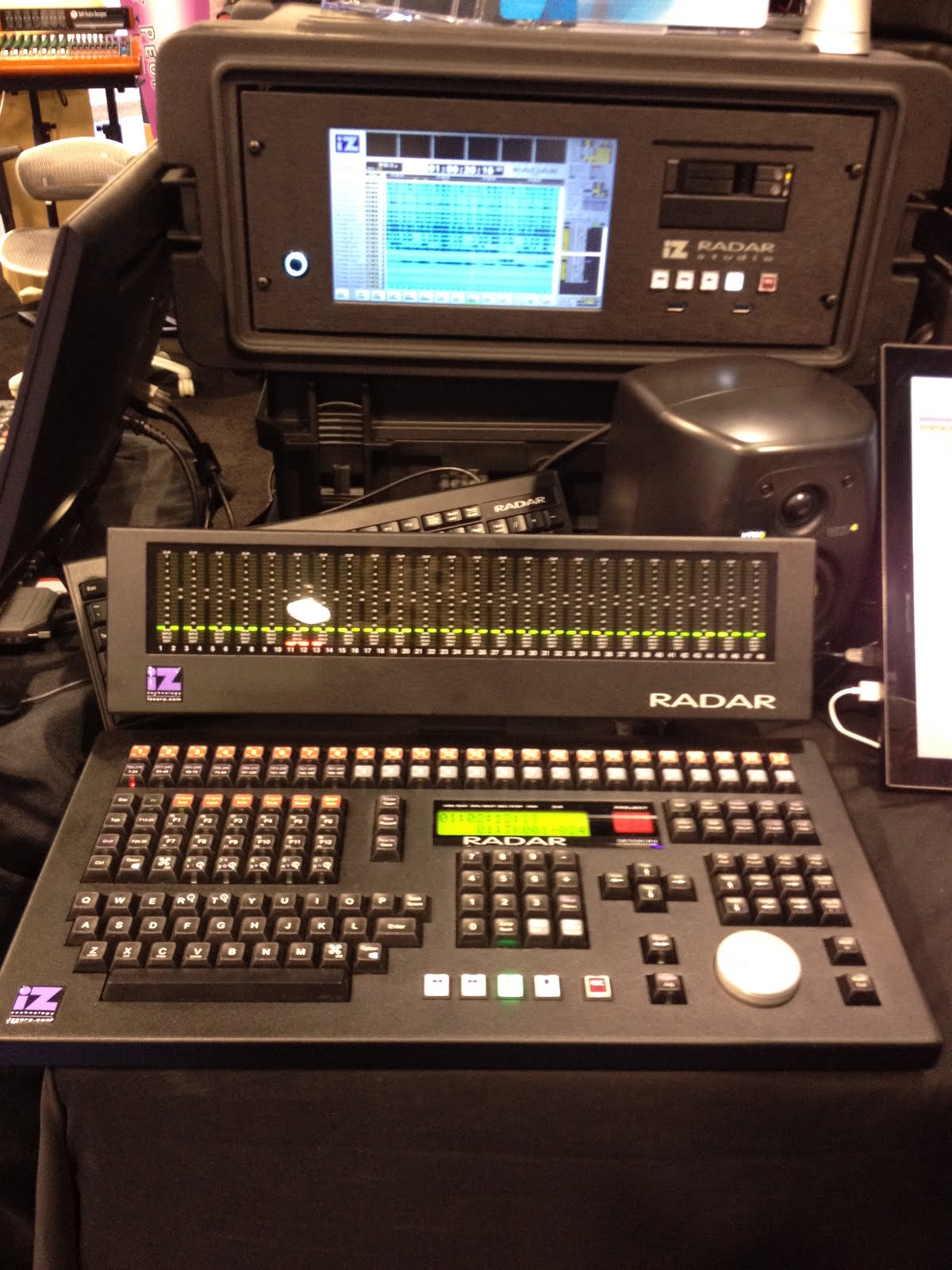
NAMM 2016: RADAR Studio

 RADAR, created by iZ Technology Corporation, offers a complete studio all in one hardware system that now also runs Protools natively!
 Formerly known as one of the most reliable digital audio recording systems with recordings from bands such as U2 and Neil Young, they are expanding its ease-of-use and even Stevie Wonder loved the touch and feel of the system after visiting the exhibit twice!
The session controller has very firm and durable buttons with quick access to a number of hotkeys. You can use it with any DAW of your choice, and it now supports slim solid-state drives. If you decide to make a purchase, you get free tech support for 10 years.
They were also nominated for a NAMM Tec award in the, "Recording Devices" category!


Learn all about it:
Sunday, February 14, 2016
NAMM 2016: Malekko Heavy Industry

 |
| Photo by Peter Vincent |
Varigate 4
- 4-Channel, 8-Step Sequencer
- Probablity
- Repeat and Delay with Randomizer
- Global Parameter Controls
- Clock Input and Reset Gate
6AD LFO
- Attack/Decay
- Loop
- Sum Out
- +10 (For Long Modulations)
Malekko Case
- 5 Amp Total
- LED Strip Controlled by module
- Rugged Contruction
- Movable/removable Kickstands
 |
| Photo by Peter Vincent |
 Peter Vincent is an event photographer, specializing in live performance photography with a style consisting of colorful and energetic imagery. He believes that great creativity often is the result of team effort and values working closely with his clients. Based in Orange County, California, he is ready to capture outstanding images at your event. Also, explore his musical side as V1NC3NT!
NAMM 2016: Foxtone Music

 |
| Photo by Peter Vincent |
ZVEX Effect Instant Lo-Fi Junky & Fuzz Factory
- Eurorack Module Format
- CV Inputs
Custom Patch Cables, Splitters
- Fun Colors
- Inexpensive
Colour Palette
- DIYRE Color Platform (Easy Build, Low Cost)
- Triple VCA
- Up to 3 Modules
- Parellel and Serial Routing
- Sum Output
 |
| Photo by Peter Vincent |
 |
| Photo by Peter Vincent |
 |
| Photo by Peter Vincent |
 |
| Photo by Peter Vincent |
 |
| Photo by Peter Vincent |
Peter Vincent is an event photographer, specializing in live performance photography with a style consisting of colorful and energetic imagery. He believes that great creativity often is the result of team effort and values working closely with his clients. Based in Orange County, California, he is ready to capture outstanding images at your event. Also, explore his musical side as V1NC3NT!
NAMM 2016: Abstract Data
 |
| Photo by Peter Vincent |
 |
| Photo by Peter Vincent |
ADE-32 Octocontroller
- Modular Control Panel
- 8 Outputs
- 12 Modulation Types
ADE-50
- Triple VCA
- Compact Size
ADE-51
- Envelope Generator
- Compact Size
ADE-33 Logic Boss 2 *protoype*
- 2-Stage Logic & Pattern Generation
- A/B Inputs
Peter Vincent is an event photographer, specializing in live performance photography with a style consisting of colorful and energetic imagery. He believes that great creativity often is the result of team effort and values working closely with his clients. Based in Orange County, California, he is ready to capture outstanding images at your event. Also, explore his musical side as V1NC3NT!
NAMM 2016: PianoDisc

 PianoDisc was featuring their iQ Intelligent Player System and the new ProRecord QuietTime. Retrofit virtually any piano, converting it into a player piano for live concerts, entertainment, and education. The iQ Player System Standard Package comes with over $1,400 free music and video performances - over 500 songs and 16 videos from 35 albums. It is also compatible with hundreds of apps.
The ProRecord is a digital hybrid solution for acoustic piano through USB, MIDI, and Silent Piano functions. Learn to play, compose, create sheet music, or capture your own performances.

Saturday, February 13, 2016
NAMM 2016: PNOscan

 PNOscan expands the possibilities of your piano or keyboard.
 Install the device into your instrument and you're ready to record, practice, and perform.
Specifics:
- Sensors: Optical Sensing of Keys and Pedals
- Sampling rate: 1000 tiems per second./per sensor
- Latency: <2ms
- Retrofit capable: (no need to move the piano)
- I/O: 5 pin MIDI, USB, and PNOmation
- Configuration: # of notes in system configurable
- Variable Trigger Threshold: Captures trills and fast repeats
- Advanced Customization: Using an available PC based application
Sunday, February 7, 2016
NAMM 2016: Jack Pharaoh - Monster GO-DJ

This year we spotted Jack Pharaoh jamming on Monster Go-DJ Device:
NAMM 2016: Nektar
 |
| Photo by Patrick Young |
 |
| Photo by Patrick Young |

Bio: Electrical Engineer and sole proprietor of Speaker Feature Studios, Patrick Young spends much of his free time designing software synthesizer patches and plugins for other artists and content creators.
Links:
Friday, February 5, 2016
Remidi

Remidi is a young company based in Austin (TX). 4 over the 5 founders come from Torino (Italy).
We’re specialized in building wearable music instruments and we're about to run our first Kickstarter campaign.
Our first product is the t8, the first midi instrument composed by a bracelet and a glove, that turns your whole hand into a musical instrument.
Friday, January 29, 2016
NAMM 2016: Keith McMillen Instruments


It includes:
- Low-noise Preamps, even for phono
- 6 balanced ins
- 8 balanced outs - 4 stereo out
- Headphone jack
- All touch sensitive
- Many FX to choose from
Also, Billy White gave us a fantastic demonstration of the unreleased K-Board Pro 4:
Sunday, January 24, 2016
NAMM 2016: Jambe Software Update
Learn more and pre-order at getjambe.com
Daniel Berkman jamming on Jambé during NAMM 2016. Jambé, a new versatile and expressive electronic percussion instrument was previewed last year at Winter NAMM, and in a series of sneak peaks for leading members of the Los Angeles music industry community. Jambé returns to NAMM in 2016 unveiling a vastly more powerful sound engine and an online store ready to take pre-orders.
Thursday, January 21, 2016
The NAMM Show 2016 Begins!
 |
| Photo Edited. Original by Jesse Grant / Getty Images for NAMM. |
 JamHub is introducing JamHub® Stage!
This is a very sturdy unity built to control your in-ear monitors, wedges, and powered speakers on stage. You can also connect it to a computer for full-band analog monitoring while multitracking.
It includes:
- Master faders
- Main XLR outputs
- 14ch analog FOH send
- 14ch USB multitrack output
- Upt to 10 indificual mixes
- Ultra-low-noise circuitry

MusicSchoolOnline.com presented their educational services which encompasses lessons in a number of musical instruments, music theory, and even recording all taught by professionals in the industry such as session musicians. A student of MusicSchoolOnline, Whitney Myer, is using it to learn bass, guitar, and piano and explained the ease of use in her experience with the website.
Learn more about Whitney Myer at her website: http://whitneymyer.com/
She closed with a remarkable live performance:
 |
| Left: Mark Bain | Right: Chris Stack |

 BeatBuddy has beeen at previous NAMM Shows and is expanding! They were featuring their new very sturdy BeatBuddy Mini at $149 which is half the price of their main unit, $299. To cut the cost, the mini is slightly more compact with no midi sync or firmware updates. Their foot switch has great response and a solid build as well at $49.
  Boveda Inc. was displaying their 2-Way Humidity Control Technology, which cannot be found anywhere else in the world! It monitors ambient humidity while adding or removing moisture. Place the pack in a container and it instantly begins to work.
 For instant news on NAMM 2016, follow us on instagram, facebook, and twitter:
- https://www.instagram.com/volterock_review
- https://www.facebook.com/VolterockPress
- https://twitter.com/volterockreview
Subscribe to:
Posts (Atom)


